Error Message : Command Timed Out
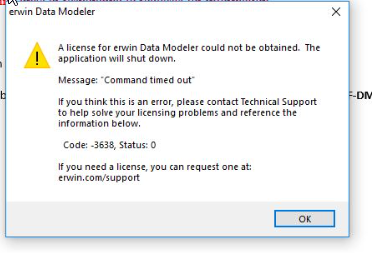
Solution:
1 - Go to folder: C:\ProgramData\erwin\Data Modeler\Licensing
2 - Delete what is inside the Licensing folder.
3 - Try launching erwin again with your license code.
If still the problem exists Reboot the machine and that should resolve the issue.
Note :
Important!
1. Ensure hidden files and folders display in Windows Explorer or you may be unable to locate this directory. If you cannot locate this directory in Windows Explorer:
Enable "Hidden items"

2. Open "run" application by pressing windows key + R and typing in %ProgramData%, from there you will find erwin or CA folder
3. You may have to ask your local system administrator to grant you specific Microsoft Windows permissions to manually copy the license file(s).

