How to change table and column names to PascalCase (also known as "UpperCamelCase" or "DromedaryCase") in erwin Data Modeler?
In PascalCase the first character of word names should be capitalized with no additional separators such as special characters or spaces.
Steps:
To use PascalCase on the physical side of the model....
1- Go to the menu Actions | Model Naming Options | Name Mapping Tab.
2- For Special Characters, change “Leave” to “Remove”
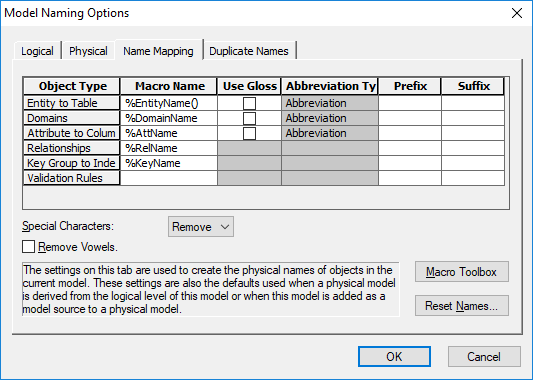
3- Click OK
"Special Characters" as three options...
-Leave- the default behavior which replaces any spaces in logical names with an "_". For example
"My Table Name" --> "My_Table_Name"
-Remove- which removes any spaces between words. For example:
"My Table Name" --> "MyTableName"
-Replace- which replaces the spaces between words with a specified character ("Replace with..."). For example, if a "." is used:
"My Table Name" --> "My.Table.Name"

