Steps:
That article shows how to set up the mart server to use your own tomcat cluster or a different third party application server/web server such as JBoss, GlassFish, WebLogic, WebSphere, Jetty, etc.
Solution: please see the below steps.
NOTES:
Please see the erwin Mart Server Release Notes especially the section Install or Configure a mart:
2. You need to change the setting of the Mart Server software installation (erwin+Mart+Server+2020+R1+SP1+(64-bit).exe or similar) from the default. When you get to the part Custom Setup, make the settings reflect the same settings as in figure 1:
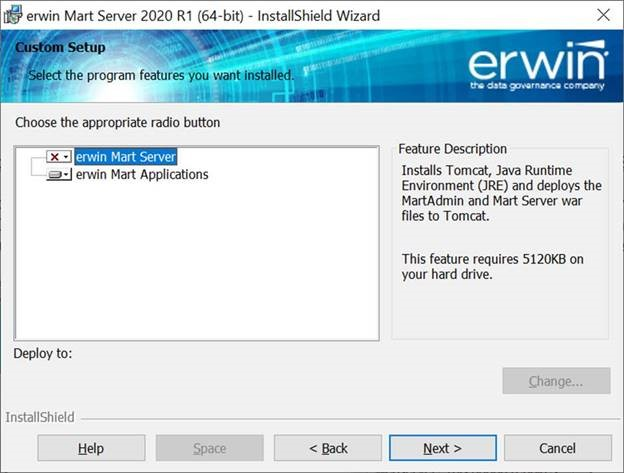
Figure 1. Use an existent webserver with the MartServer (not the MartServer service).
3. If you have an existing Tomcat and you want to use that instead of the Tomcat that is installed with the MartServer software, make sure the JRE_HOME path reflects the JAVA JDK installation.
e.g. c:\program files (x86)\java\jre1.8.0_241
4. To deploy erwin Mart server to an existing Tomcat, you will need to perform the following steps:
Open the folder C:\Program Files\erwin\Mart Server r9\Tomcat64\webapps
Move MartAdmin.war, MartServer.war to the webapps folder under your tomcat install path. e.g. c:\program files\Apache software foundation\Tomcat8.5\webapps
Open the folder from C:\Program Files\erwin\Mart Server r9
Move the folder \MartUpgrade to the Apache Software Foundation root folder e.g. “c:\program files\Apache software foundation”
Move the file MartConfiguration.exe to the Apache Software Foundation root folder e.g. “c:\program files\Apache software foundation”
5. Configure MartServer (figure 2). When configuring the MartServer, the Mart Administrator tab controls the web server. Choose the port number for your existing Web Server or Tomcat (erwin Inc's Tomcat is registered to 18170, yours will be different). The port for Tomcat is usually 8080. You will probably also need to choose a different application name.
Application Name
Specifies the application name with which the Web Server is identified.
Default: MartServer
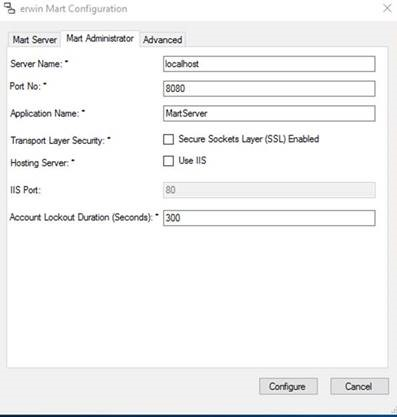
Figure 2. The Configure MartServer window

