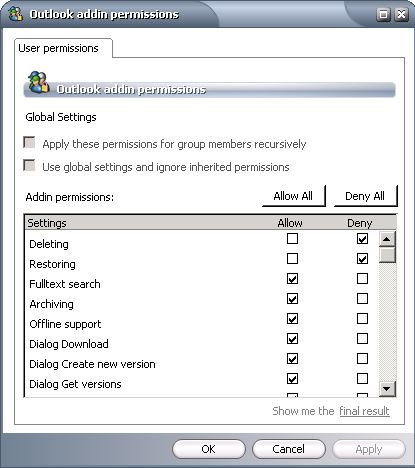
| Deleting | User will be able to mark items in the archive for deletion. This means that items marked for deletion will be no longer viewable in Enterprise Manager. Note that items that have been marked for deletion are still available for specific searches until they are past their retention period and purged from the system with a Delete Files job. |
| Restoring | Users will be able to manually restore items from the archive |
| Fulltext search | Users will be able to conduct full-text searches within their archived items. |
| Archiving | Users will be able to manually archive items themselves. |
| Offline support | Users will be able to work offline with archived items. Note that this requires local caching of archived folders and can take a lot of drive space on the local client computer. |
| Dialog Download | Users will see a message box displayed when downloading. |
| Dialog Create new version | Users will see a message box displayed when creating a new version of an archived item. |
| Dialog Get versions | Users will see a message box displayed when retrieving a specific version of an archived item. |
| Version View | Users will be able to view different versions of archived items |
| Dialog Get fulltext results | Users will see a message box displayed when getting full-text search results. |
| Dialog Identifying user | Users will see a message box displayed when identifying the user on launching Outlook. |
| AddIn Options | Users will be able to set some options, such as whether to auto-synchronize when Outlook starts/exits; what format to save archived messages in. |
| Create version | User will be able to create new versions of previously archived items. |
| Select retention | Users will be able to choose which retention category should be used when archiving. |

