Toad for Oracle will migrate automatically the settings from 2 versions behind, however starting in Toad for Oracle 12.6, the Utilities menu can make easier the process to migrate settings to higher versions of Toad for Oracle.

Steps:
1. Click on Utilities Menu | Copy User settings | Export | Choose the path and store the zip file (for example on your Desktop)
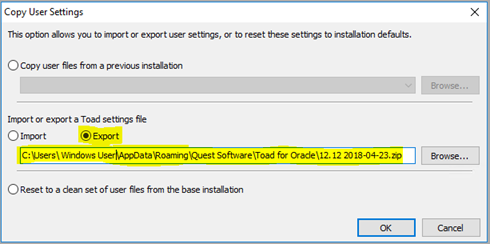
2. Open the latest version of Toad for Oracle in the new machine, and go to Utilities Menu | Import | Choose the path of the zip file generated from the old Toad.
This process may take a few minutes, and after that, Toad for Oracle will restart by itself.

