In most cases, splitting a table into two tables containing different columns is required in order to address database design changes, business requirements or even adding domain restrictions retroactively (for example, isolating currencies in a separate table and enforcing referential integrity via a foreign key to ensure that only valid currencies can be stored in the database). However, splitting tables may actually offer additional performance benefits to the database.
For instance, in scenarios where a table contains large, but rarely used fields, moving them to a separate table will increase performance as the frequently used data will be stored in a much smaller table, and the rarely used data will only be looked up when required. The impact on performance caused by the occasional joining will be compensated just by having SQL Server look up the data that's used more often in a table which requires less disk space. In general terms, JOIN costs CPU time whereas large, flat tables cost disk space and disk access time. From a performance point of view, the disk is still orders of magnitude slower than memory and since large tables usually increase the number of logical reads, sacrificing some CPU cycles on that extra JOIN might significantly improve the overall database performance.
Additionally, in some cases table refactoring does wonders for the performance of the UPDATE queries. For example, in a scenario where a table holds the phone records of 10,000 customers from the same area, an area code change would result in having to update 10,000 rows. However, had the area code has been separated into a different table referencing the original one with a foreign key, the update would've affected just a single row.
Now, here comes the catch - splitting a table is rather easy when designing the database. However, once the database is populated and deployed, partitioning a table vertically becomes a whole new ball game. To split a table in this case, the following steps need to be taken:
To add insult to injury, this process is not only tedious, as witnessed by the steps above; it's very error-prone, particularly since missing a dependency due to SQL Server's own shortcomings, can completely break the database down the road. So, is there any way to enjoy the performance benefits of splitting large tables without any of the risks to the integrity of the database?
Indeed. This is where ApexSQL Refactor can do the formatting itself.
ApexSQL Refactor is a free SQL Server Management Studio and Visual Studio add-in which formats and refactors SQL code using 11 code refactors and over 160 formatting options. It expands wildcards, fully qualifies object names, renames SQL database objects and parameters without breaking dependencies and much more.
To safely split a table using ApexSQL Refactor:
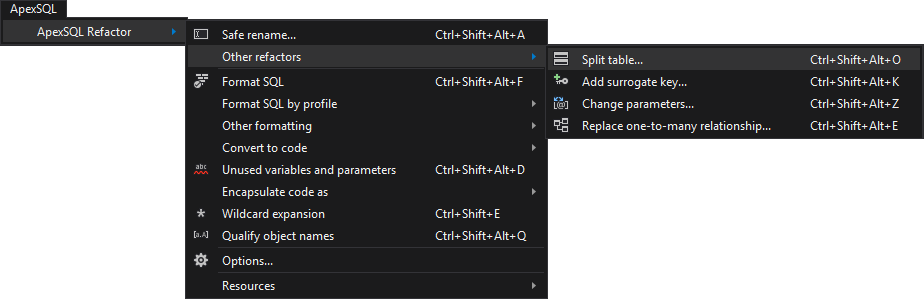
From the Other refactors sub-menu select the Split table command:
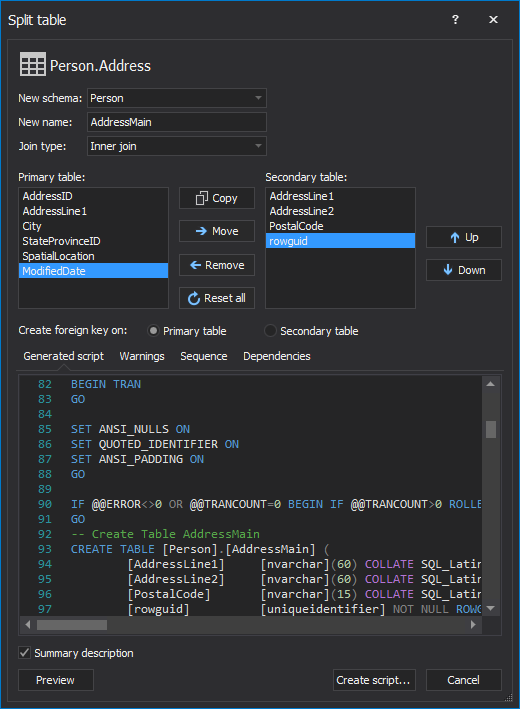
Bottom line, gaining database performance by splitting large tables doesn't have to be potentially hazardous to the database functionality or even time-consuming as ApexSQL Refactor can split the tables, without risking to break any dependencies, in a single click.

