Can't find the respected migrated chat data on target after migration when i migrate chat user A that has
Scenario 1 : 1 to 1 private chat with Chat Partner B
Scenario 2 : different option selected when archive and live chat migration is selected
Scenario 3 : Chat Add on License not utilized or not deducted even after enable the option.
Scenario 1 - 1 to 1 private chat with Chat Partner B
- Migrating user A--> Allan DeYoung
Source Chat of User A "Allan DeYoung" with chat partner User B "Nestor Wilke"

After Live Chat migration
Target Chat of User A "Allan DeYoung" with chat partner User B "Nestor Wilke" as a group chat with <user A and User B - Migrated>

Scenario 2 - different option selected when archive and live chat migration is selected
Please refer to Documentation here
In the details section scroll down to
> Example 1: Assume that you are migrating chats on June 30.
Screenshot updated : 2024 June 11
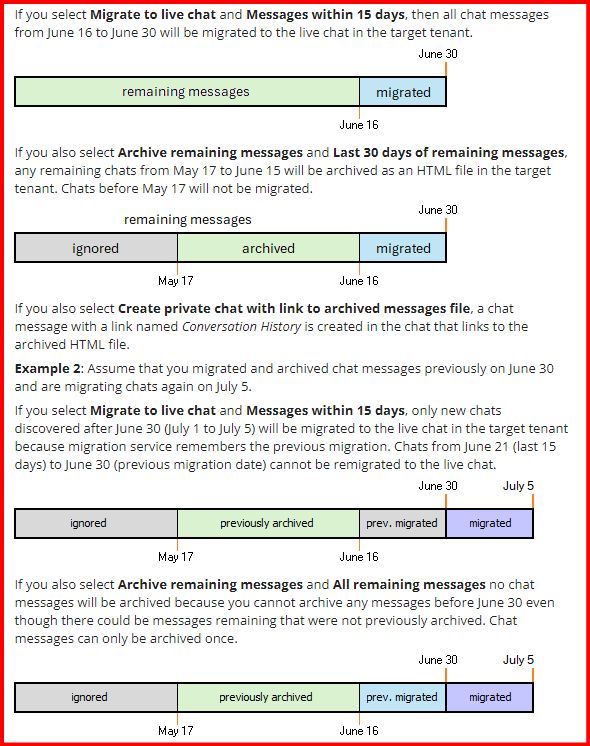
Scenario 3 - Chat Add on License not utilized or not deducted even after enable the option.
It can be verified if the user has been enabled with archive chat before, rearchiving is not supported unless reset which will take long time, but it would not be able to enabled with the chat add-on license.
Scenario 4 - Can a target group chat of migrated partially chat remain the same Group chat to chat with source user?
No, As per limitation of Microsoft API< ODM Teams chat Migration is migrating the chat to target with target users.
Scenario 5 - Will Chat Data Be Duplicated if a Live Chat Migration is Re-run in live Chat migration?
No, by design it will not create duplicate chat, mode detail can be get from this KB 4380926.
Scenario 6 - Comparison between 1:1 Chat migration options
Find the sample from this KB 4306502.
Scenario 7 - What is the expected view or outcome in Target chat for 1:1 and group chat
Due to Microsoft limitations, ODM Live Chat Migration will always be a "New Group Chat " at the target, regardless of whether the source is 1:1 or a group chat.
Scenario 8 - Will migrated chat re-migrate after deleting the group chat from the target
No, it is by design; whichever chat data migrated will remain migrated, only new chats will be detected and migrated to the target chat.
Scenario 9 - Needed an Identical Experience to the source chat at target chat content.
A new Feature "migration Mode" that utilizes the import apu has been introduced and explained in Knowledge Base
*** It will only applicable to new Live chat migration, existing or incremental would not works