WFU is created to update Windows 10 versions, the job finishes with completed status but ends with all 0s as a result.
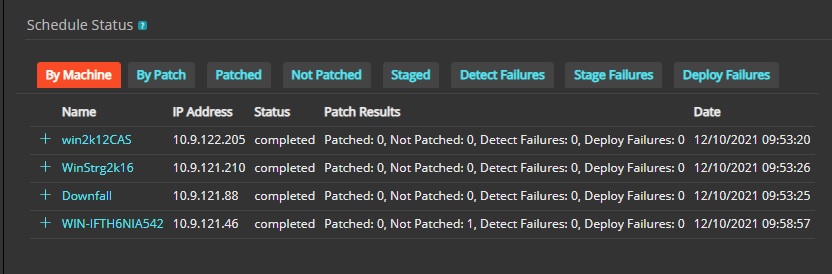
Whenever a Patch, WFU or DELL Update schedule ends with status completed but the results is all 0s, this means that the target device's were not applicable to the patch or version attempted to be deployed or the device is missing one or more pre-requisites that makes the detect logic mark the device as not applicable.
It is important to understand that this "completed" status does not mean deployment was done successfully, it just means that the task was sent to the device, the device received the instructions, ran it and because it was not applicable then no deploy is attempted to complete the task.
In this article we are going to focus on the main reasons WFU jobs may end under this situation and how to address this issue to make sure the devices are applicable to the WFU versions intended to deploy.
A common scenario is that incorrect feature update edition is selected (Business or Consumer) and this will make the device not applicable when job runs the detect ending the task.
It is important to note that the edition is determined by the Installation method (OEM, Retail, USB Media from the Media Creation Tool, Volume) and not by the Windows version itself (Home/Pro/Enterprise/Education) as explained on KB322297.
If unsure which one to select it is recommended to select both consumer and business so the device can be scanned for both signature and determine which is applicable.
Before running WFU job it is necessary that the device has installed the Latest Cumulative Update (LCU) and the rest of OS patches such as Servicing Stack Updates (SSU), so running patch job for OS patches is highly recommended before trying update Windows 10 version via WFU.
Missing LCU and/or SSU can result also in a device getting the version as not applicable like in the logs line below:
[2022-02-01.13:53:05][KacePatch:KacePatchModule::Detec] KacePatchModule::Detect: Processing patch ID: PTCH267884, Name: Feature update to Windows 10 (business editions), version 21H1, en-us x64
[2022-02-01.13:53:05][KacePatch:KacePatchDetectFile::L] KacePatchDetectFile::Load: loaded detect file C:\ProgramData\Quest\KACE\kpd\581db5ea-be94-4bdc-a2d2-7e07bf13d81f.kpf
[2022-02-01.13:53:05][KacePatch:KacePatchDetectFile::P] KacePatchDetectFile::Parse: patch info
[2022-02-01.13:53:05][KacePatch:KacePatchDetectFile::P] KacePatchDetectFile::Parse: handler specific data
[2022-02-01.13:53:06][KacePatch:KacePatchDetectFile::P] KacePatchDetectFile::Parse: CMD discover product
[2022-02-01.13:53:06][KacePatch:KacePatchDetectFile::P] KacePatchDetectFile::Parse: WSI
[2022-02-01.13:53:08][KacePatch:CmdLar::Execute ] CmdLar::Execute - LAR And results 0
[2022-02-01.13:53:08][KacePatch:CmdLar::Execute ] CmdLar::Execute - LAR Base results 0
[2022-02-01.13:53:08][KacePatch:DetectFileCmdBase::Det] DetectFileWsi::Detect - Product is not present
[2022-02-01.13:53:08][KacePatch:KacePatchModule::WsiDe] KacePatchModule::WsiDetect: Product detection came back false
[2022-02-01.13:53:08][KacePatch:CmdBar_WindowsLanguage] CmdBar_WindowsLanguage::Execute: MUI returned language en-US, compare to en-us
[2022-02-01.13:53:08][KacePatch:KacePatchModule::Detec] KacePatchModule::Detect: Patch PTCH267884 Name Feature update to Windows 10 (business editions), version 21H1, en-us x64 Applicable No
Additional issues may still prevent the WFU from being successful after getting the version as applicable, such as incompatible applications, out of date drivers, connectivity issues... and others, for those scenarios please follow KB326899 for guidance in looking blocking components during deploy phase.
Additionally tools like SetupDiag can be helpful to determine reasons for deploy failures.
For assistance or questions on this topic, please contact our Tech Support.

