Shares are inaccessible on Windows Server 2012 R2 from within Windows XP, Windows Server 2003 or Windows Server 2008. The following error message may be displayed:
Opening pipe \\SCRIPTLOGIC\pipe\DesktopAuthority_StatusServer_NamedPipe_9100_0000. RESULT: 64=The specified network name is no longer available
A registry setting on Windows Server 2012 R2 must be modified for communication with older operating systems
Note: This is not a Desktop Authority Issue
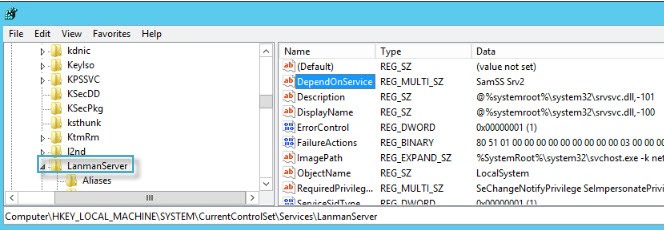
Back up the Registry Hive/Key and make the following change:
HKEY_LOCAL_MACHINE | SYSTEM | CurrentControlSet | Services | LanmanServer | DependOnService
Original Value: SamSS Srv2
Change to: SamSS Srv
Note: Just delete the 2
After making the change, reboot Windows Server 2012 R2
Note: You may also need to reboot the clients/servers involved
Note: Quest does not provide support for problems that arise from improper modification of the registry. The Windows registry contains information critical to your computer and applications. Make sure you back up the registry before modifying it. For more information on the Windows Registry Editor and how to back up and restore it, refer to Microsoft Article ID 256986 “Description of the Microsoft Windows registry” at Microsoft Support.

