Cause 1:
The cause of this issue was due to an incorrect TCP/IP address in a Lotus Notes Server connection document, within the personal address book on the CMN workstation.
Cause 2:
The Notes client is open on the CMN free busy server.
Cause 3:
The Dell Web Services are not available from Exchange/Office 365.
Resolution 1:
Verify that the CMN free busy server is able to resolve the Lotus Domino Server Names via the following methods:
1) DNS Lookup
2) Local Host File Entry
3) A connection document in the Local Personal Address Book
It is important when troubleshooting Free/Busy issues that you make sure at least one of these items resolves to the correct TCP/IP address of the Lotus Domino Server you are connecting too.
If not, then the Lotus Notes client will be unable to connect to the Lotus Domino Server, and CMN will be unable to process Free/Busy requests from Microsoft Exchange / Office 365 .
Resolution 2:
Exit the Notes client on the CMN free busy server.
Resolution 3:
Verify that the Dell Web Services are available to Exchange/Office 365.
1.) Navigate to the CMN free busy server.
2.) Open the CMN Management Console.
3.) Click on the Quest Web Services screen on the left hand pane.
4.) Copy the Quest Autodiscover URL into Notepad.
5.) Copy the Quest EWS URL into Notepad.
6.) Navigate to the Exchange CAS server.
7.) Open Internet Explorer and navigate to both URLs.
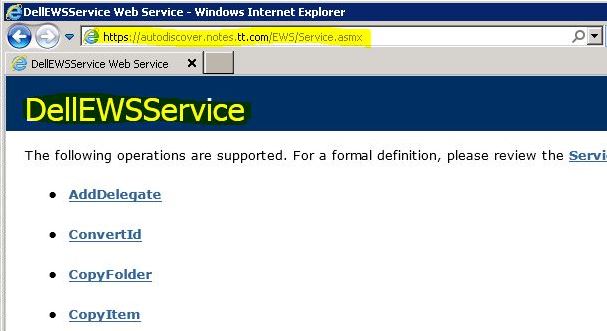
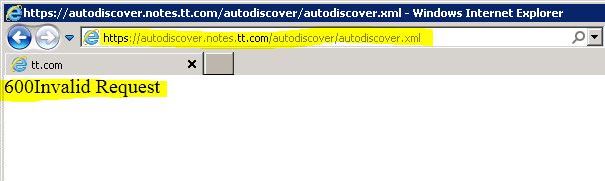
8.) Compare results to the screenshots of successful results below.
Note: If you are coexisting with Office 365, try navigating to each URL with Internet Explorer from outside of your network (i.e. from the Internet).
Expected Autodiscover URL result:
Expected EWS URL result: