The trace file is an html type log file used to troubleshoot the configuration and element processes of the Desktop Authority client on a client workstation for both Computers and Users.
The User Management trace file is called “SLTrace.htm” located in the Users Temp Directory (C:\Users\User_Account\AppData\Local\Temp\Desktop Authority on Windows 7) or (C:\Documents and Settings\User_Account\Local Settings\Temp\Desktop Authority on Windows XP).
The Computer Management trace file is called “ComputerManagementTrace_DayofTheWeek.htm located in C:\Windows\Temp\Desktop Authority for either Windows 7 or XP.
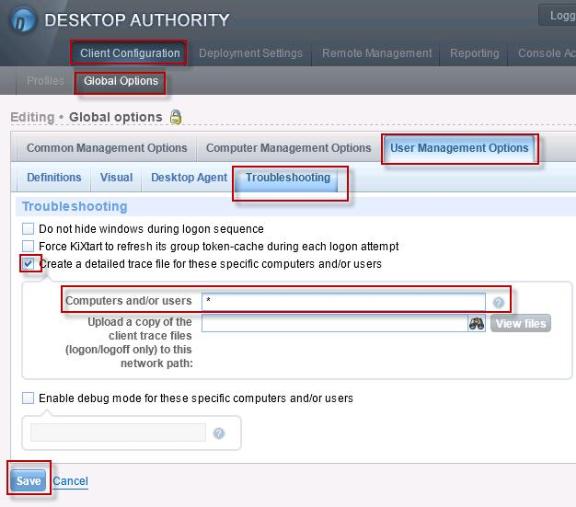
From the Client configuration tab within the Desktop Authority Manager console follow the steps below:
Select Global Options | Edit to activate the ability to make changes.
![[image]](https://support.quest.com/KBArticleImages/SL4192/b6364b08.jpg)
Select User Management Options | Troubleshooting
Check “Create a detailed trace file for these specific computers and/or users”
Put an asterisk (*) for all users/computers, or an individual user account/computer.
Click on the “Save” button.
Once all the steps are complete click on “Replicate” button in the lower left.
![[image]](https://support.quest.com/KBArticleImages/SL4192/12070493.jpg)
Note: The Computer Management trace is enabled by default.

