The Deskop Authority opsmaster service is trying to access the EmbargoComAPI.exe and slEmbargoAPI.dll and is not able to find the files. The Opsmaster service is unable to access the files due to duplicate files existing in the same folder with dllBak extensions.
On the server where Desktop Authority is installed open Internet Explorer browser and enter the following URL: Http:// %ServerName%:Port#/OpsMaster/OpsMasterWebSvc.asmx. If an application error page is generated when accesing the URL, verify that the EmbargoComAPI.exe and slEmbargoAPI.dll files do not have a .dllBak extension.
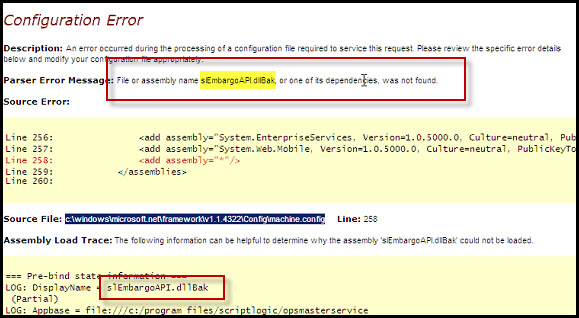
If the files do have .dllBak extension navigate to C:\Program Files (x86)\ScriptLogic\OpsMasterService\bin (64 bit) or C:\Program Files \ScriptLogic\OpsMasterService\bin (32 Bit) on the Desktop Authority server and delete the duplicate EmbargoComAPI.exe and slEmbargoAPI.dll files that exist in the folder with the dllBak extensions. Once the files have been deleted restart the Opsmaster service on the Desktop Authority server.

