You have opened an archived message and click on forward however in the Outlook form that is presented you are not able to edit the contents to add your own contents.
To workaround this issue you can do the following.
When an archived message is first opened the Aftermail form is used to display the message. If a message is opened in this form and you attempt to forward it will not be editable.
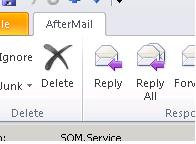
In order to edit a message the Message Class of the message must have changed. A stubbed message has the class IPM.Note.AfterMail but a reconstructed message has the class IPM.Note.

When you open a message, check the name of the form used has changed from Aftermail to Message. This will occur if the message class has changed and the message has been reconstructed:

With the message now reconstructed, you can now successfully forward the message.

